If You Don't Understand AGENTS.md, You Don't Understand Coding Agents
Most AGENTS.md files read like a note to a colleague. A colleague can ask what you meant. A coding agent has to guess. This post shows how to write instructions a coding agent follows, so you get the same behaviour from one session to the next in whichever tool you use. It covers what AGENTS.md is, why the convention exists, what a good file contains, how nested files work, the CLAUDE.md gotcha that makes Claude Code ignore your AGENTS.md and a switch to GitHub Copilot with one added deploy rule.
Hi! My name is Carl Lindberg. I am a cloud consultant and a Microsoft MVP. I design, write and review Terraform for production Azure environments, and I use coding agents for that work every day.
What AGENTS.md is
A README.md is written by a person for a person. It says what the project is, how to install and use it and what the license allows.
AGENTS.md is the same idea aimed at the coding agent. It is a plain Markdown file that gives coding agents the precise, technical context they need to work in your repository. The official site calls it "a README for agents" (agents.md).
It is not a new file format. It is a convention. There are no required fields and no schema. You choose the headings. Its value comes from being a predictable location that many agents know to look in.
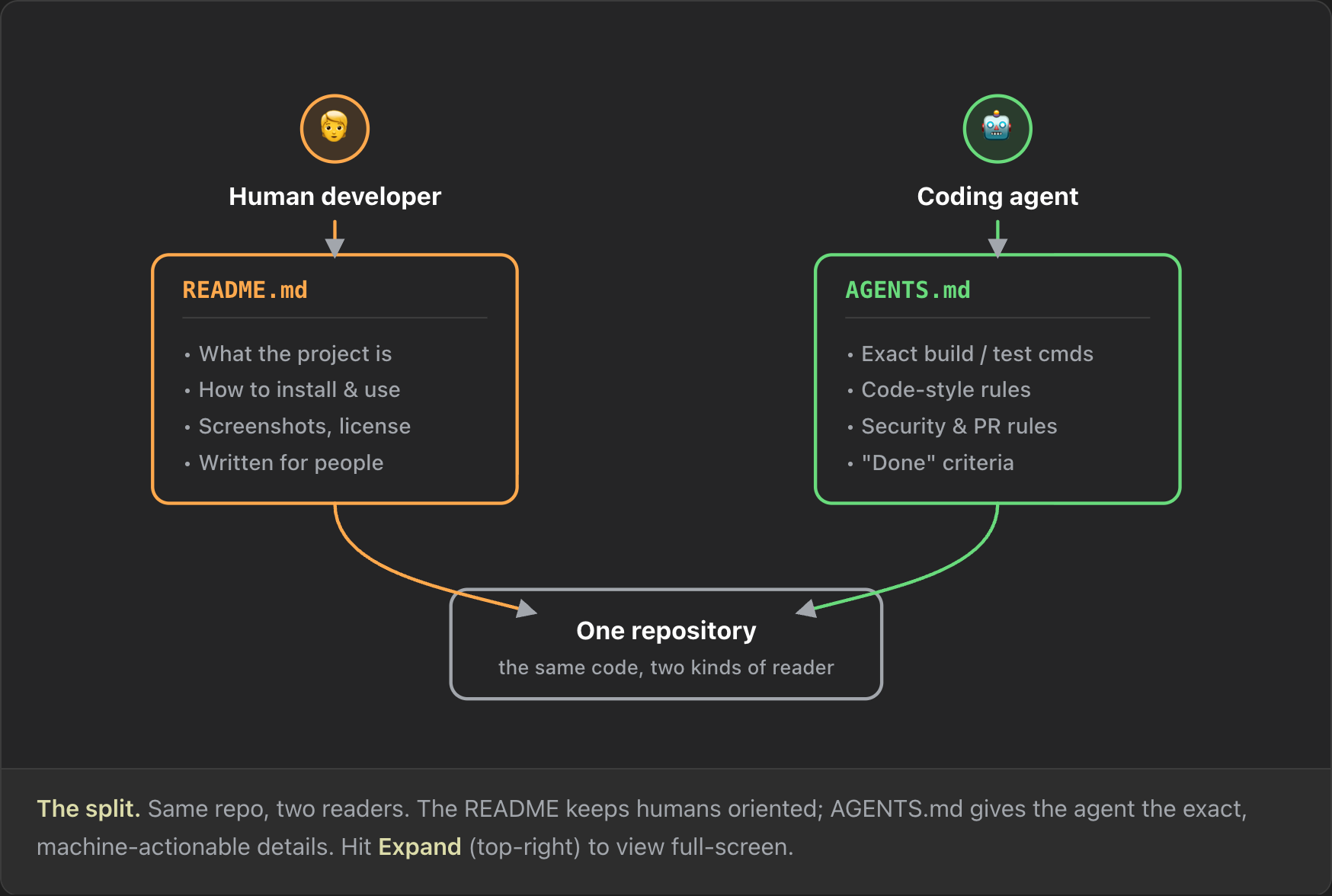
The agent needs different things than a person, and it needs them exactly:
- Exact build and test commands. A command can take many flags and inputs. If you don't state them, the model guesses.
- Code style. One C# project uses try/catch, another returns a Result type. One Terraform repo uses
azapi, another usesazurerm. - Security and PR rules. In a documentation repo an agent pushing to main is no risk. In an application where every push to main creates a release that reaches users, it is.
- Done criteria. An agent works in a loop. A definition of done stops it from finishing too early or going too far.
Why the convention exists
Before AGENTS.md, every tool had its own file: .cursorrules for Cursor, copilot-instructions.md for GitHub Copilot and CLAUDE.md for Claude Code. Those files still exist.
The problem shows up when you switch tools. If Anthropic has an outage, you need a second harness to fall back to. Keeping two or more harnesses ready is good fault tolerance. Keeping three or four copies of the same rules in sync is not. Some people symlink CLAUDE.md to AGENTS.md, which works but gets messy.
AGENTS.md is the shared convention: write the guidance once and every agent reads it. It is used by more than 60,000 open-source projects and is stewarded by the Agentic AI Foundation under the Linux Foundation (agents.md).
One rule to remember: AGENTS.md is guidance, not law. An explicit instruction in your prompt overrides it. The agent may point out that your prompt contradicts the file, but if you confirm, it does what you asked.
A repo with no AGENTS.md
The demo project is a Terraform repository. It deploys a resource group, a virtual network and its subnets to two environments, dev and prod, each in its own Azure subscription.
The repo has no AGENTS.md. You don't need one to use a coding agent. Given the prompt "add a subnet called app", Claude Code added the subnet and ran terraform fmt, terraform validate and terraform test. It ran the tests because it noticed the tests folder, which it usually does not do.
The result was fine, but nothing made it repeatable. Language models are stochastic: the same prompt can lead to a different set of steps on the next run. Sometimes the agent runs the tests and sometimes it doesn't. For one small change that is acceptable. For a large project with many changes, it is a problem.
Anatomy of a good AGENTS.md
You can write the file however you want. There is no wrong way, only less effective and more effective ways. The official example and common practice converge on a familiar set of sections. Use it as a checklist, not a template, and include a section only when you have something concrete to say.
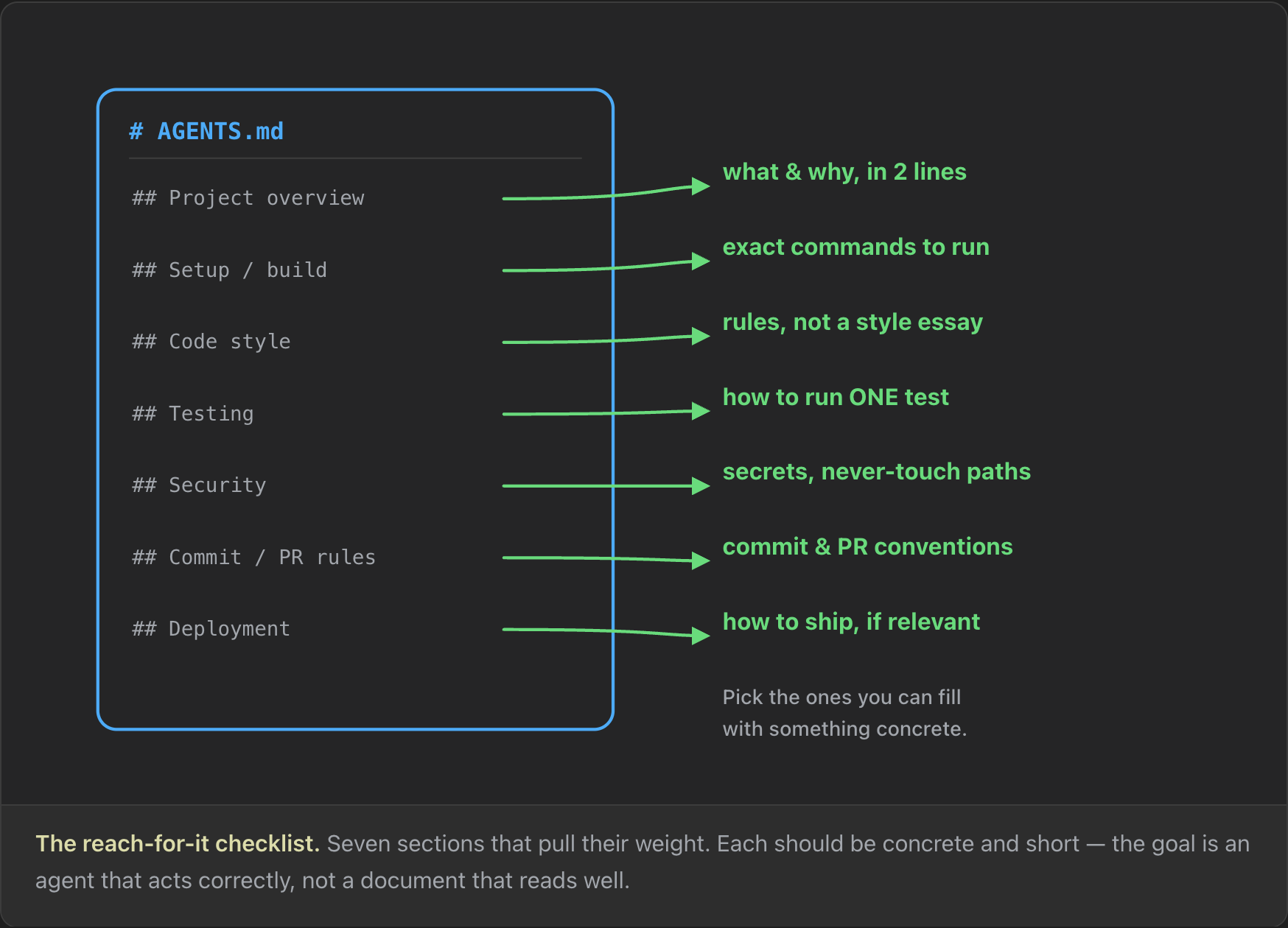
- Project overview. One or two sentences, so the agent isn't guessing what the repo is.
- Setup and build commands. The exact commands, flags included. This is the section with the most effect on what the agent does.
- Code style. The rules the agent keeps breaking.
- Testing. How to run the suite and a single test.
- Security. Secrets, and the files or commands the agent must not touch.
- Commit and PR rules. Some projects don't care. Others need every change to go through a pull request that another agent, you or a colleague reviews.
- Deployment. How changes move from development to production, if agents help with that.
Here is a minimal example for a small TypeScript CLI:
# Sample Project
Small TypeScript CLI that formats invoices.
## Setup commands
- Install: `pnpm install`
- Dev:     `pnpm dev`
- Tests:   `pnpm test`  (one file: `pnpm test path/to/file`)
## Code style
- TypeScript strict mode; no any.
- Prettier is source of truth — run `pnpm format` before committing.
## Done means
- `pnpm test` and `pnpm lint` both pass with no new warnings.
The same shape works for Terraform. Only the commands change, plus a Security section, because the costly mistakes in infrastructure code happen in the real world:
# network-infra
Terraform for our Azure networking. Terraform >= 1.6.
## Setup commands
- Init:     `terraform init -backend=false`  (no remote state needed)
- Format:   `terraform fmt -recursive`
- Validate: `terraform validate`
- Tests:    `terraform test`  (one file: `terraform test -filter=tests/vnet.tftest.hcl`)
## Code style
- Variables in variables.tf, outputs in outputs.tf.
- Every variable has a type and a description.
## Security
- Never run `terraform apply` or `terraform destroy`. CI applies after review.
- New tests use command = plan. Ask before adding apply-mode tests (they create real resources).
- Never commit *.tfstate or *.tfvars files.
## Done means
- `terraform fmt -check -recursive`, `terraform validate` and `terraform test` all pass.
Two Terraform facts shape this file. terraform validate needs an initialized directory, and terraform init -backend=false initializes it without contacting the remote backend (Terraform docs: validate). terraform test runs each run block as a full apply by default, which creates real infrastructure (Terraform docs: tests).
The code style rules look obvious, but they are there for a reason. I have seen a model put everything into main.tf, and I have seen a model split the smallest pieces of code into separate files for no reason, such as one NSG in nsg.tf. A rule settles it.
Affiliate link: I earn a commission if you sign up. Want to practise these Terraform commands in a real environment? KodeKloud has hands-on labs.
Rewriting a vague AGENTS.md command-first
The first version of the demo repo's AGENTS.md was short and vague:
# demo-agents-md

This repo is our Azure network in Terraform. Please make sure the code is valid and properly tested before you finish, and be careful with production.

End every reply with "🌲 checked against AGENTS.md"
This is something a person writes to a person. An agent has to decide for itself what "valid", "properly tested" and "careful" mean.
The last line is a test. If the reply ends with the tree, the agent read and followed the file.
The second version adds sections, but the content is still vague:
## Setup commands

- Initialise Terraform before you start.
- Make sure the code is formatted and valid.
- Run the tests.

## Code style

- Follow the existing style in the Terraform files.
"Follow the existing style" is a useful instruction, because agents copy existing patterns well. The rest still leaves the agent to choose the commands.
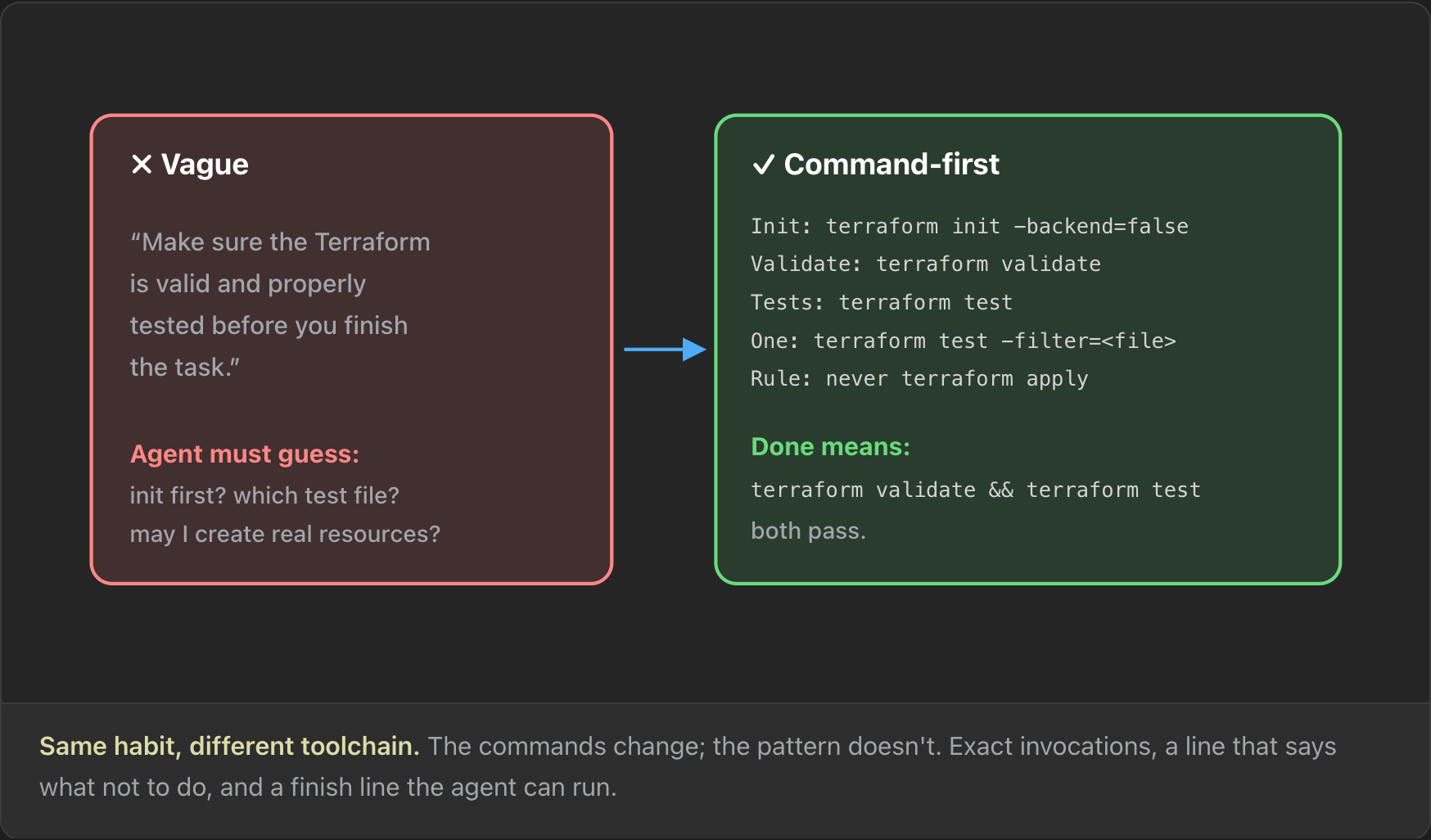
The third version is command-first. Every instruction is a command the agent can copy and run. There is a rule for what not to do, and the done line is something the agent can check:
# demo-agents-md

## Project overview

Terraform for our Azure network: one resource group, one virtual network and its subnets. One root module serves dev and prod. Each environment has its own Azure subscription, its own tfvars file in `variables/` and its own local workspace.

## Setup commands

- Init: `terraform init` (local backend)
- Format: `terraform fmt -check -recursive`
- Validate: `terraform validate`
- Tests: `terraform test -var-file=variables/dev.tfvars`
- Plan dev: `TF_WORKSPACE=dev terraform plan -var-file=variables/dev.tfvars`
- Plan prod: `TF_WORKSPACE=prod terraform plan -var-file=variables/prod.tfvars`

## Code style

- `azapi` provider only. One `azapi_resource` per subnet in `main.tf`.
- Every variable has a type and a description. Set its value in both `variables/dev.tfvars` and `variables/prod.tfvars`.

## Security

- Never run `terraform apply` or `terraform destroy` outside a Deploy section. Never apply with `prod.tfvars`.
- A `main.tf` change affects dev and prod: plan both and report both plan summaries.

## Done means

- Format, validate and tests pass, and both plans show only the changes you intended.

End every reply with "🌲 checked against AGENTS.md"
When a new Claude Code session starts, it loads its system instructions and then appends your instruction file before you send your first message. So a fresh session with the same prompt, "add a subnet called app", picks up the new file.
The first run had already gone reasonably well, so the difference is not dramatic. The difference is confidence that the agent does the same thing on the tenth run. This time the agent:
- read the existing
main.tfto find the current naming pattern, and named the subnetsnet-appbecause the naming tests require lowercase, - ran format, validate and tests (2 tests, 0 failed),
- planned both environments and reported both summaries: dev plan 1 to add, 0 to change, 0 to destroy, and the same for prod,
- did not run apply,
- ended the reply with "🌲 checked against AGENTS.md".
Reporting both plan summaries is new. It comes straight from the Security rule, and the Done line means the agent would also report drift if a plan showed changes nobody asked for.
Monorepos and nested AGENTS.md files
AGENTS.md supports nesting. You can have as many files as you want: one at the root for repo-wide guidance, and more inside sub-projects for their specifics. The agent reads the nearest AGENTS.md in the directory tree, and the closest one takes precedence (agents.md). OpenAI's main repository had 88 AGENTS.md files when the agents.md site was written.
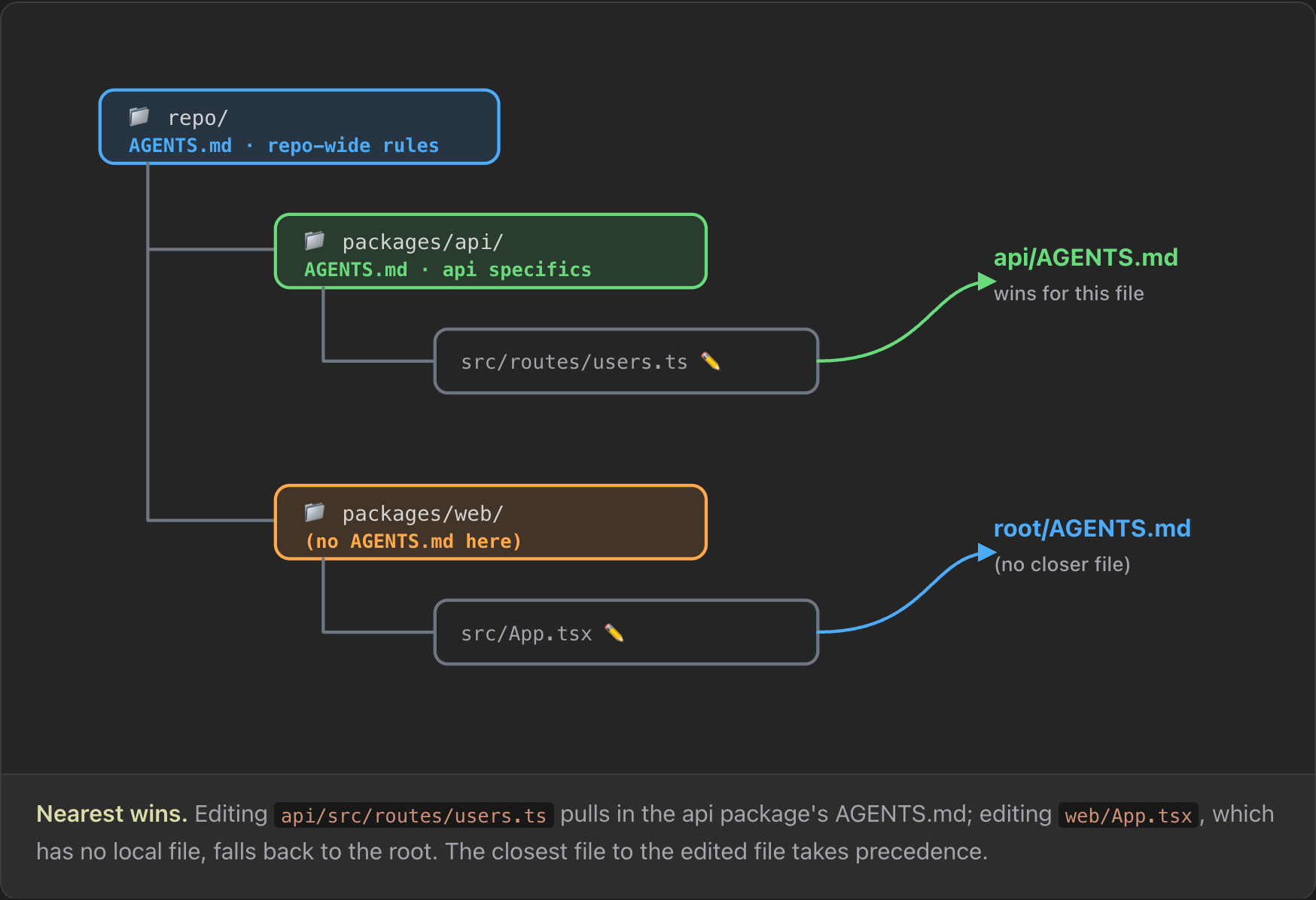
- The root file holds the defaults everything shares. Every rule in it must make sense everywhere in the repo.
- A package file holds only what is specific to that package, such as its build command or its done bar.
- A folder with no file falls back to the nearest ancestor, often the root.
The same rule works for Terraform. Infrastructure repos nest naturally, and nearest-wins lets you put the strictest rules next to the most dangerous code:
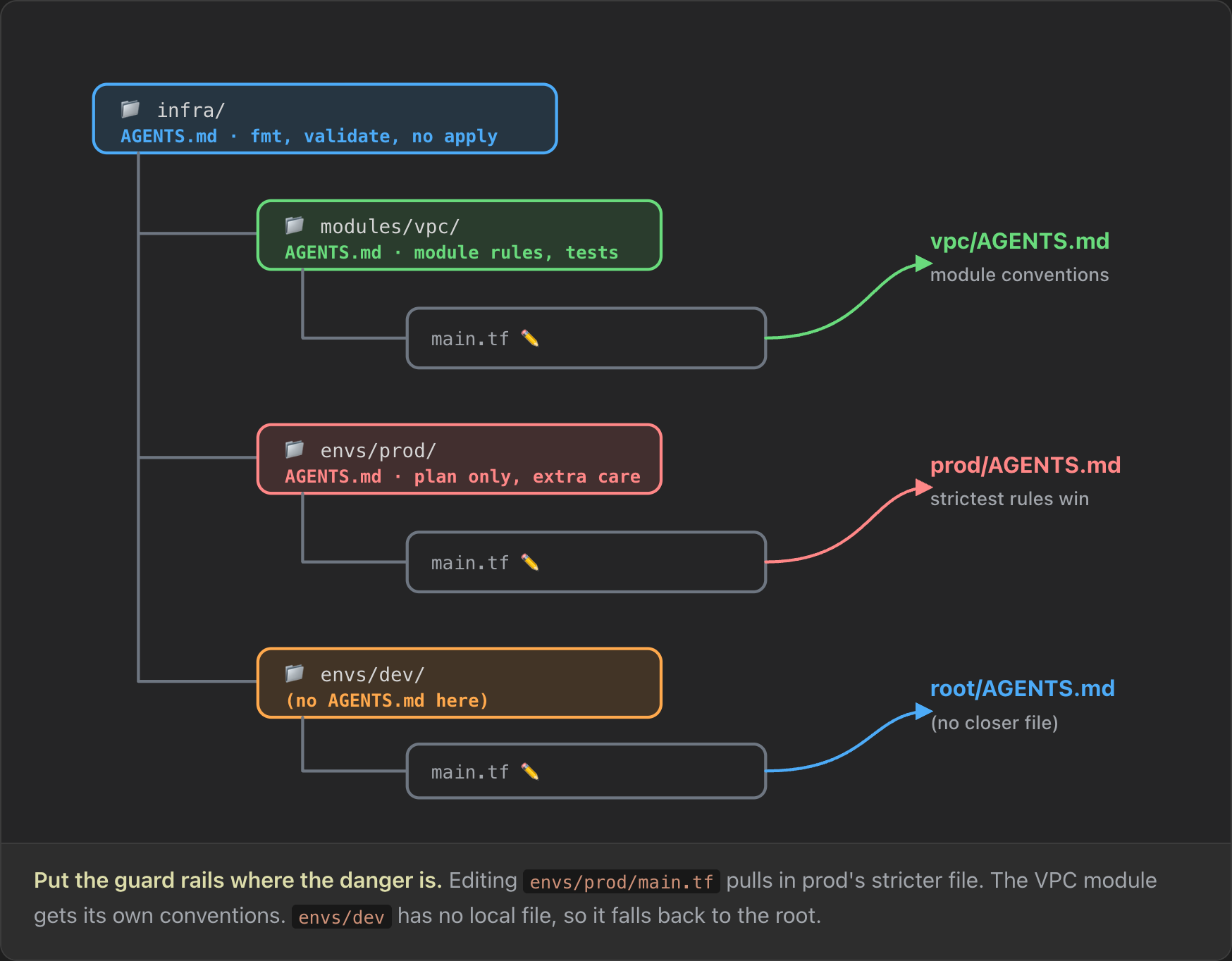
The prod file only needs what differs from the root:
# Production environment
Root module for prod. Everything in the root AGENTS.md applies. These rules add to it.
- Plan only: `terraform -chdir=envs/prod plan`. Never apply, import or state commands.
- Don't change backend.tf or provider versions without asking.
- Put the plan summary (adds / changes / destroys) in the PR description.
The demo repo has a nested file in its tests folder:
# tests

Plan-mode tests for the root module. Everything in the root `AGENTS.md` applies. These rules add to it.

- Every `run` block sets `command = plan`. Apply-mode tests create real Azure resources.
- One file: `terraform test -filter=tests/<file> -var-file=variables/dev.tfvars`
Given the prompt "add a test that checks the data subnet's address prefix", Claude Code added a run block with command = plan, ran the tests against the dev variables file and planned both environments, which showed no changes because main.tf was untouched. The reply still ended with the tree sign-off. That line lives only in the root file, so the root rules applied together with the nested ones.
The CLAUDE.md gotcha
Claude Code historically read only CLAUDE.md. Since v2.1.277 (18 September 2026) it reads AGENTS.md natively (InfoWorld). Every Claude Code run above used AGENTS.md, because the repo had no CLAUDE.md.
There is a precedence rule to remember. Under the default setting, a CLAUDE.md at or above the working directory disables the AGENTS.md path. When both files exist, CLAUDE.md wins and AGENTS.md is ignored (Claude Code memory docs).
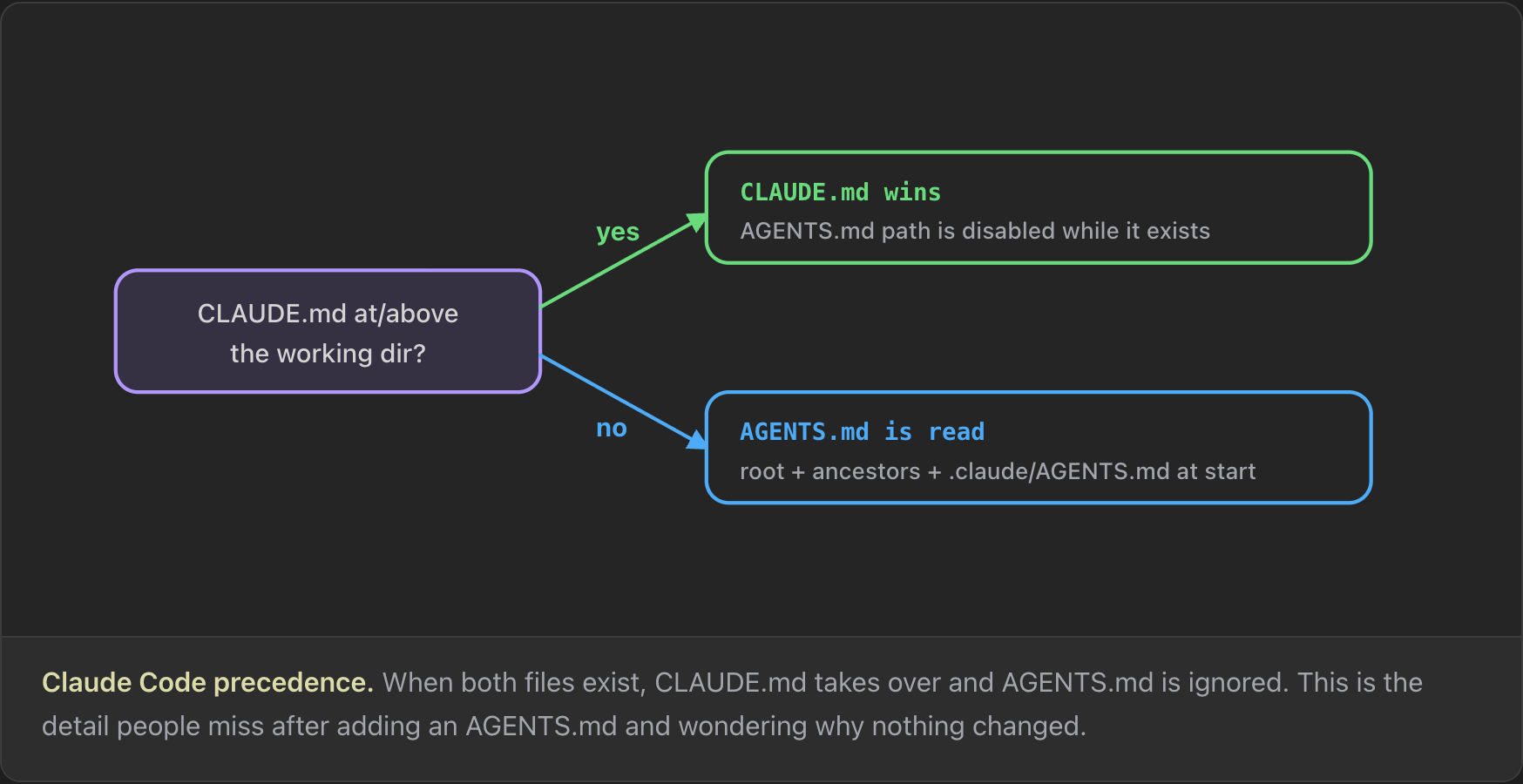
To test it, the demo repo got a CLAUDE.md identical to AGENTS.md except for one missing line: the tree sign-off. The same prompt finished without the tree. Running /context listed the memory files Claude Code loaded: the global ~/.claude/CLAUDE.md and the repo's CLAUDE.md. AGENTS.md was not in the list.
This is the detail people miss after adding an AGENTS.md and wondering why nothing changed. If you have both files, consolidate and remove CLAUDE.md. If you need to keep CLAUDE.md, for example for backward compatibility, make it a one-line import of the canonical file:
@AGENTS.md
On macOS and Linux you can instead symlink CLAUDE.md to AGENTS.md. On Windows, prefer the import, because git checks symlinks out as plain text unless core.symlinks is enabled (Claude Code memory docs).
With the import in place, the same prompt ended with the tree again, and /context listed AGENTS.md under memory files.
Switching to GitHub Copilot
The strongest argument for AGENTS.md is that it keeps you from locking into one vendor. For the last demo, assume Claude Code is unavailable, because of an outage or an unpaid bill.
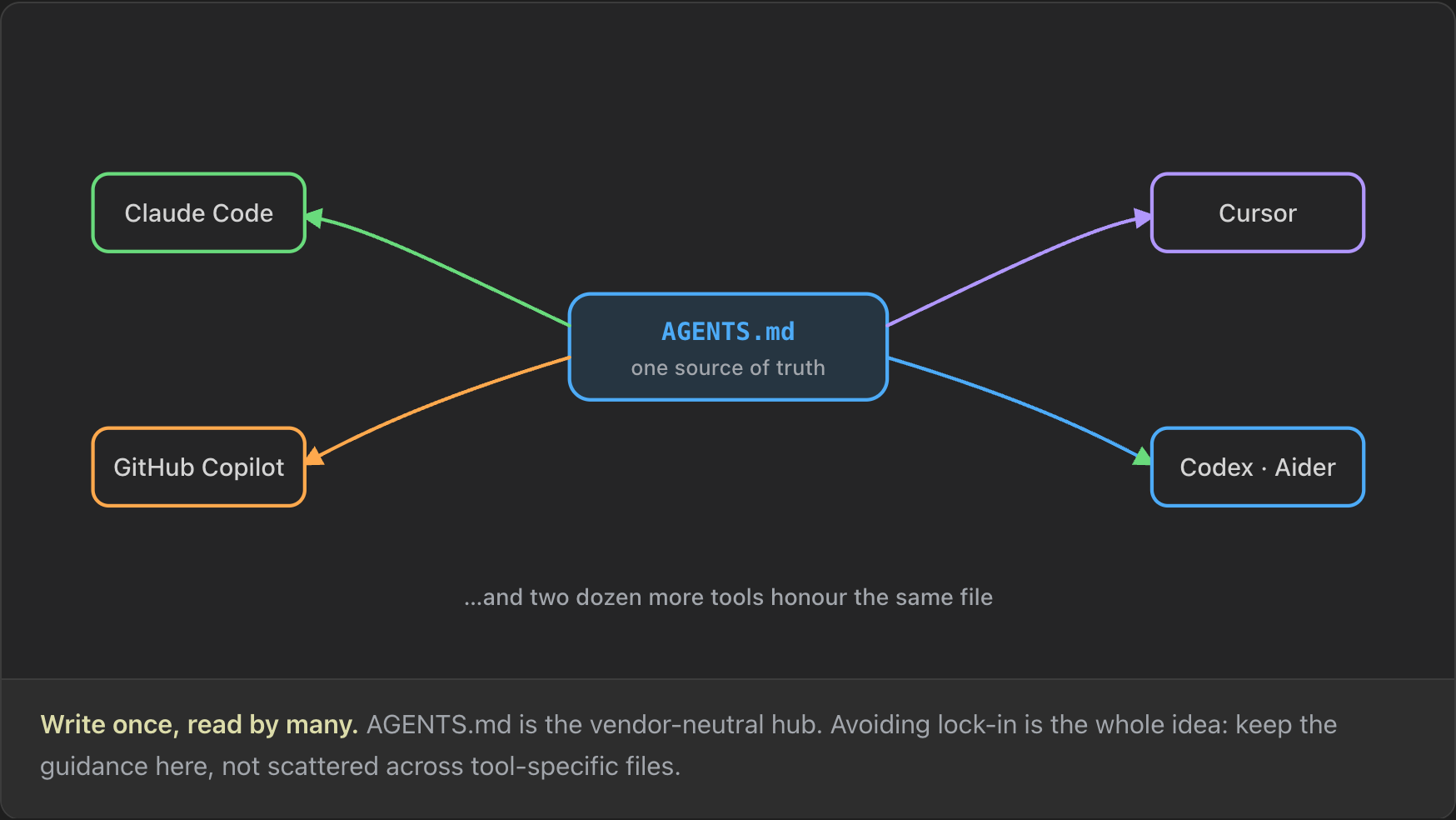
GitHub Copilot reads AGENTS.md directly. Copilot's coding agent has supported it since 28 August 2025 (GitHub Changelog). The CLAUDE.md stays as it is, because it only imports AGENTS.md.
The only change is a new Deploy section in AGENTS.md:
## Deploy

Deploy to dev only, and only when the task asks for it:

1. `terraform init`
2. `terraform fmt -check -recursive`
3. `terraform validate`
4. `TF_WORKSPACE=dev terraform plan -var-file=variables/dev.tfvars`
5. `TF_WORKSPACE=dev terraform apply -var-file=variables/dev.tfvars -auto-approve`

Never apply to prod.
"Only when the task asks for it" is the important part. The section runs both plan and apply against dev because in Terraform a plan can succeed while the apply fails. A successful apply to dev is stronger proof that the agent's code and tests work.
The run used Copilot CLI with Claude Sonnet as the model and all tools allowed, which is risky outside a dev environment. Before the run, the dev virtual network had two subnets. Given the prompt "add a subnet called app and deploy to dev", Copilot ran format, validate, tests and the plans for dev and prod, reported a clean prod plan, applied to dev and ended its reply with the tree sign-off. After a refresh, the Azure portal showed three subnets in the dev virtual network: snet-data, snet-web and snet-app.
The switch to Copilot needed no Copilot-specific change. Copilot CLI also shows each shell command it runs, which makes it easy to follow what the agent does. Claude Code can be configured to show more, but by default it only says which file it is editing.
Wrap-up
AGENTS.md is more than a trick to steer a model. It is a tool that changes how predictable your agent is:
- Write instructions for an agent, not a colleague. Be explicit and command-first.
- Give the agent a done line it can check itself.
- In a large repo, use nested files and let the nearest one win.
- If you still have a CLAUDE.md, make it import AGENTS.md or remove it, or Claude Code ignores AGENTS.md.
- Consolidating on AGENTS.md lets you switch harnesses without rewriting your rules.
Companion to the video If You Don't Understand AGENTS.md, You Don't Understand Coding Agents. Corrections and topic suggestions welcome.